
Manga – Member Download
$ 39
Give users the ability to download manga and save it on their local machine, limited by user roles. It can be extended by a membership plugin to sell VIP package
Regular license
A regular license gives you access to the installation files and dedicated support for 1 year. After 1 year:
- You can continue to use this add-on on your site as long as you want
- You can transfer this add-on license to another site which you owns
- You cannot access to the new version released after your license's expired date
- Your dedicated support is expired
Are you looking for a way to let users download manga and read offline? The Manga – Member Download plugin is the perfect solution! It allows users to download entire manga chapters as a .zip file directly from your website. Plus, you can control who has access by setting user role permissions.
Key Features of Manga – Member Download
- One-Click Manga Download – Users can download an entire manga series, including all images and chapters, in a single .zip file.
- User Role Permissions – Control who can download by restricting access to specific user roles. Supports custom user roles for flexible permissions.
- Seamless Front-End Integration – A Download Manga button will appear automatically on each manga page, providing a smooth user experience.
- Optimized for MangaBooth Themes – Works perfectly with all MangaBooth themes, ensuring full compatibility.
Instruction
- Go to Plugins > Add New and upload the plugin
- Go to Manga > WP Manga Settings > Manga User Download Settings to configure the plugin
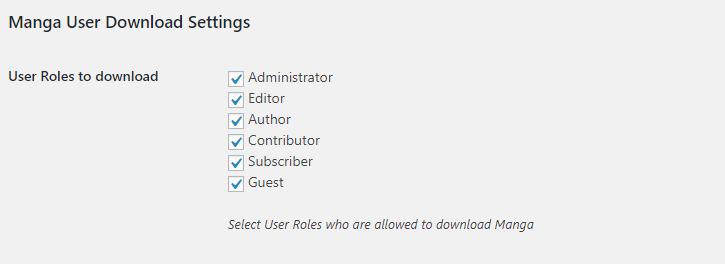
Member Download Manga settings
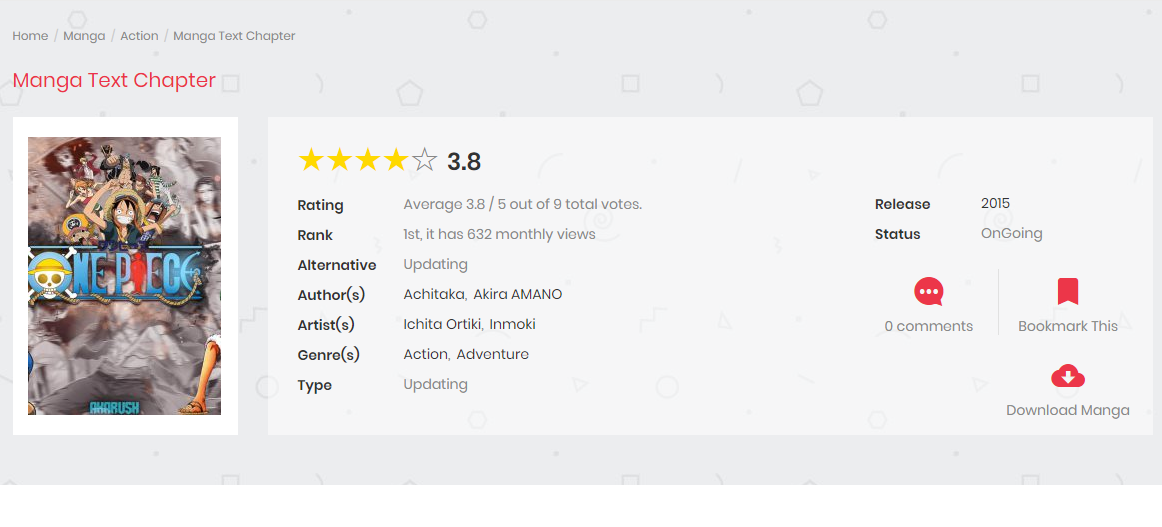
The Download button will appear in each manga page
Why Use This Plugin?
Let your readers download a whole Manga or a single Chapter as a zip file, straight from your Madara site. You decide who can download, what can be downloaded, and how often, and premium chapters stay protected.
Key Features
- Download a whole Manga or a single Chapter: a “Download Manga” button on the Manga page and a download icon next to each chapter in the chapter list
- Works with image and text chapters: image chapters are zipped with all their pages, novel chapters are zipped as text files
- Local and external storage: chapters stored on your server or on supported external storage can both be downloaded
- Clean zip structure: files are organized into Volume / Chapter folders
- Translation ready
Flexible Download Control
- Site-wide switches: turn Manga Download and Chapter Download on or off for the whole site
- Per-Manga override: each Manga has its own “Allow Download” and “Allow Chapter Download” settings: Use plugin setting, Enable Download or Disable Download
- Per-Chapter override: each Chapter can be set to Use Manga Setting, Enable or Disable. Disabled chapters are also left out of the full Manga download
- User roles: choose which user roles can download, including guests
Premium Chapter Protection
- Full integration with WP Manga – Chapter Coin: a premium chapter can only be downloaded by users who have bought it
- The full Manga zip only contains free chapters and chapters the current user has bought
- Manga authors, administrators and editors keep full access, the same as in Chapter Coin
Anti-Abuse & Security
- Download limits: set the maximum number of Manga and Chapter downloads per hour. Logged-in users are counted per account, guests per IP address
- One-time download links: each download link works only once, expires after 5 minutes and only works for the user who requested it, so links cannot be shared
- Private file storage: zip files are kept in a protected folder under random names. Their real location is never shown to visitors
- Automatic cleanup: zip files are deleted automatically 5 minutes after they are created, so your disk does not fill up
- Server-side permission checks: role, Manga, Chapter and purchase rules are checked on every download request, not only by hiding buttons
- Nonce-protected requests and permission checks on all admin actions
Built for Performance
- Optional nginx X-Accel-Redirect support: nginx sends the zip files directly, so large downloads don’t keep PHP busy
- The settings page shows the ready-to-use nginx configuration for your site
Requirements
- Madara theme
- WP Manga (Madara Core) plugin
- Optional: WP Manga – Chapter Coin and myCRED for premium chapter protection
- A valid license key to activate the plugin
What’s New in 2.3.1
- Per-hour download limits for Manga and Chapters
- One-time, expiring download links and private zip storage
- nginx X-Accel-Redirect support
- “User Roles to download” setting is now checked on every download request
- Stronger security for download requests and admin settings
You must be logged in to post a review.
- 2.3.1 - 12.10.2026
- New - Download limit settings: maximum Manga downloads and Chapter downloads per hour for each user (guests are counted by IP address)
- New - Zip files are stored in a private folder and served through one-time download links that expire after 5 minutes and only work for the user who requested them
- New - Option to serve zip files with nginx X-Accel-Redirect
- Security - "User Roles to download" setting is now enforced on download requests, not only on the download buttons
- Security - Nonce check for download requests
- Security - Chapter download setting in admin can only be read/changed by users who can edit the Manga
- Notes for upgrading:
- Download limits are 0 (no limit) by default. Set them in Madara settings > Manga User Download Settings
- Before enabling X-Accel-Redirect, add the nginx location shown in the settings page to your server block, otherwise downloads will fail
- On nginx, .htaccess is ignored. To block direct access to the private folder, add:
location /wp-content/uploads/madara-user-download/ { deny all; } - Behind Cloudflare or a proxy, configure
real_ip_header/set_real_ip_fromin nginx, otherwise all guests share one download limit - If guest pages are cached for longer than 12 hours, the nonce in the cached page expires and guest downloads fail. Keep cache lifetime under 12 hours or exclude Manga pages from cache
- Custom code calling the
madara-user-download-manga/madara-user-download-chapterajax actions must send thenonceparameter. The responsezip_pathis now a one-time download link andzip_diris no longer returned
- 2.3 - 10.1.2026
- New - Settings to enable/disable Manga Download and Chapter Download for the whole site (in Madara settings page)
- New - "Allow Download" setting of each Manga is now a select box: Use plugin setting / Enable Download / Disable Download
- New - "Allow Chapter Download" setting in each Manga: Use plugin setting / Enable Download / Disable Download
- New - "Allow Download" setting of each Chapter is now a select box: Use Manga Setting / Enable / Disable
- New - Support WP Manga - Chapter Coin: premium chapters can only be downloaded by users who bought them. Manga download only includes free and bought chapters of the current user
- New - Chapters set to Disable are excluded from Manga download
- New - Chapter and Manga zip files are deleted automatically after 5 minutes
- Update - Existing "Allow Download" values of Manga are migrated automatically: checked Manga are set to Enable Download, others are set to Disable Download
- Fix - chapter_download column is not created if the license is activated after the plugin, or the chapters table did not exist yet
- Fix - "Allow Download" of a chapter is always checked in the chapter edit modal
- Fix - HTML in volume and chapter names (e.g. lock icons) breaks folder names in Manga zip file
- 2.2 - 12.05.2022
- Update - Enable download each chapter
- 1.0.2 - 30.8.2018
- Fix - Guest cannot download
- Fix - Cannot zip chapters which are stored on CDN
pdpcomics (verified owner) –
Ver 2.2 -> Download each chapter not working for Madara Version 1.7.4.1